
Free playbook · episode 3 · 30 seconds to connect
Stop shooting videos nobody is searching for. The vidIQ + Claude playbook, free.
The 30-second connection, and the five prompts I use to pick every video before I shoot it.
How Zack Petrocca picked every video in the AI, Honestly series.
- Connect
- Topics
- Check
- Outliers
- Titles
That link expired. Pop your details in and we will send a fresh one.
Takes under 30 seconds. Free, no card.
You will also get The System Drop, our weekly newsletter. One click to leave, anytime. We never sell your information. Privacy.
Why this exists
My next two videos were forecast at 17 to 700 views.
I had the scripts written. They were about what I wanted to say, which is the normal way to do it, and nobody was searching for any of it.
So I connected vidIQ to Claude and asked what people actually type in. “Claude for beginners” came back at 162,000 searches a month. We threw the scripts out and rewrote them. It takes a minute and it saves you a week.

Who built this
Only things I actually run.
I am Zack, a fractional COO. I build the operating systems behind founder-led service businesses, and I run my own on Claude. Every playbook here is a system I use every week, written up the way I would walk a friend through it. The one rule under all of it: hand AI the task, never the judgment.
Zack Petrocca, Founder, Origin
What is inside
The setup, and the five prompts.
Copy each one, change the bracket to your world, and paste it into Claude.
-
The connection
Claude, Settings, Connectors, vidIQ, Connect. That is the whole setup.
Try this"About 30 seconds, once."
-
Find topics worth making
Rising searches with low competition, with the monthly volume next to each one.
Try this"Find me topics in [your industry] with rising searches and low competition."
-
Check an idea first
Before you shoot it: how many people search for this, and is there a better version of the title.
Try this"I am planning a video called [your title]. How many people search for this?"
-
Read what is working
Shorts from small channels that went far past their usual, and what their hooks share.
Try this"Find Shorts about [topic] from channels under 100,000 subscribers that beat their average."
-
Title it like a search
Five titles that match what people actually type, from your own script.
Try this"Give me 5 titles that match what people type into YouTube. Here is the script."
Five prompts. The first one pays for itself before you shoot anything.
Open the playbookLook inside
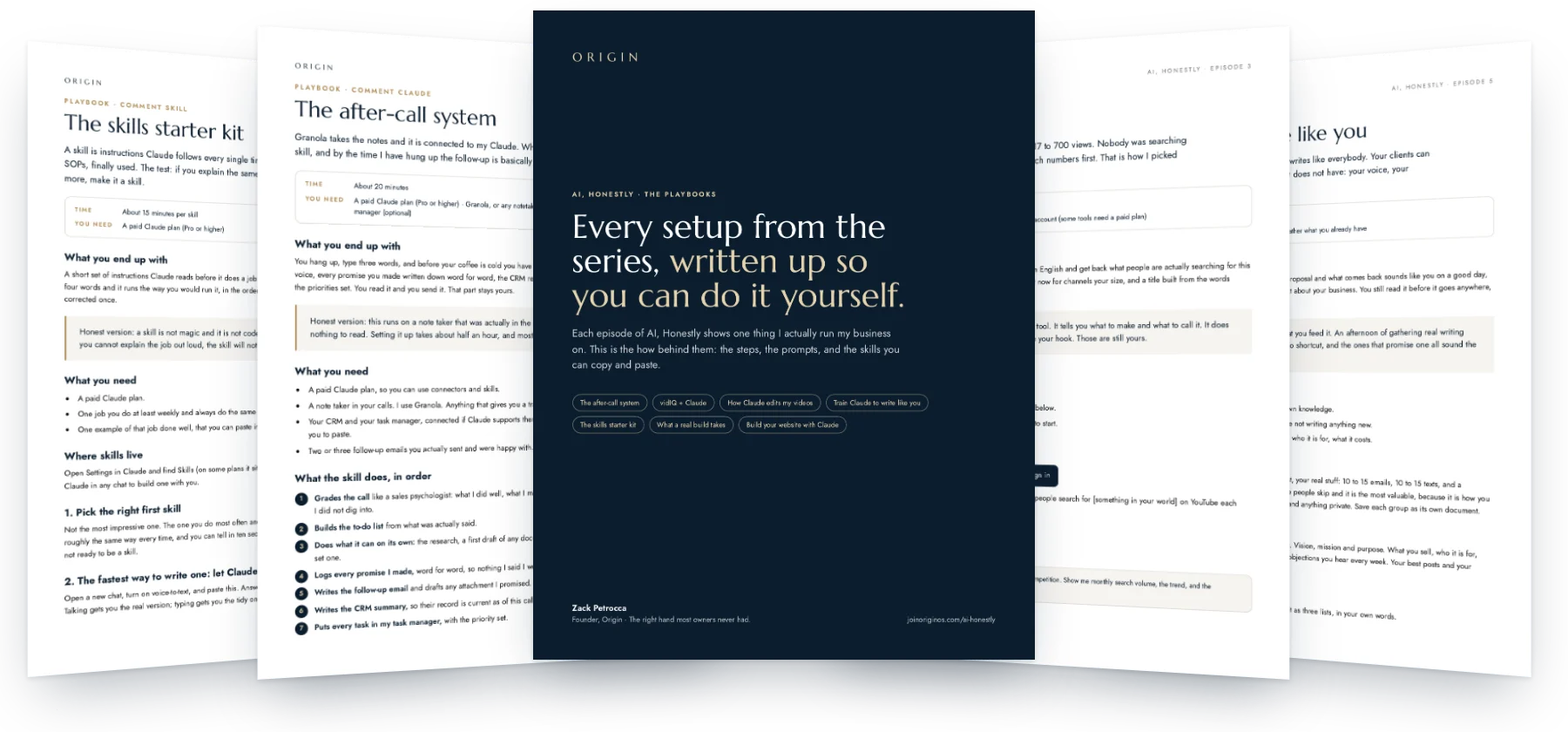
Real pages, not a summary.
Who this is for
This is for you if
- You make videos and pick topics on instinct.
- You want the title to be a search, not a slogan.
- You would rather know before you shoot than after you post.
Skip it if
- You are not making video.
- You want a tool to make the video for you.
How fast it pays off
Useful the same day.
-
Minute one
Connect vidIQ inside Claude.
-
Minute two
Run the first prompt on your own niche and read the real numbers.
-
This week
Check every idea before you shoot it. Keep the ones people search for.
Setup: About 30 seconds to connect. One email opens this playbook and every other one in the library.
Before you open it
Do I need a paid vidIQ plan?
You need an account, and some of its tools need a paid plan. The connection itself is free to set up.
Are the search numbers exact?
No. They are estimates. Treat them as a direction, not a promise.
Does this work outside YouTube?
The numbers are YouTube search. The habit, check before you make it, works anywhere.
Know before you shoot.
Your first name, your email, and the whole library is open.
Open the playbookYou are in. Every playbook is open, and a copy is on its way to your inbox.
AI, Honestly · Episode 3
vidIQ + Claude
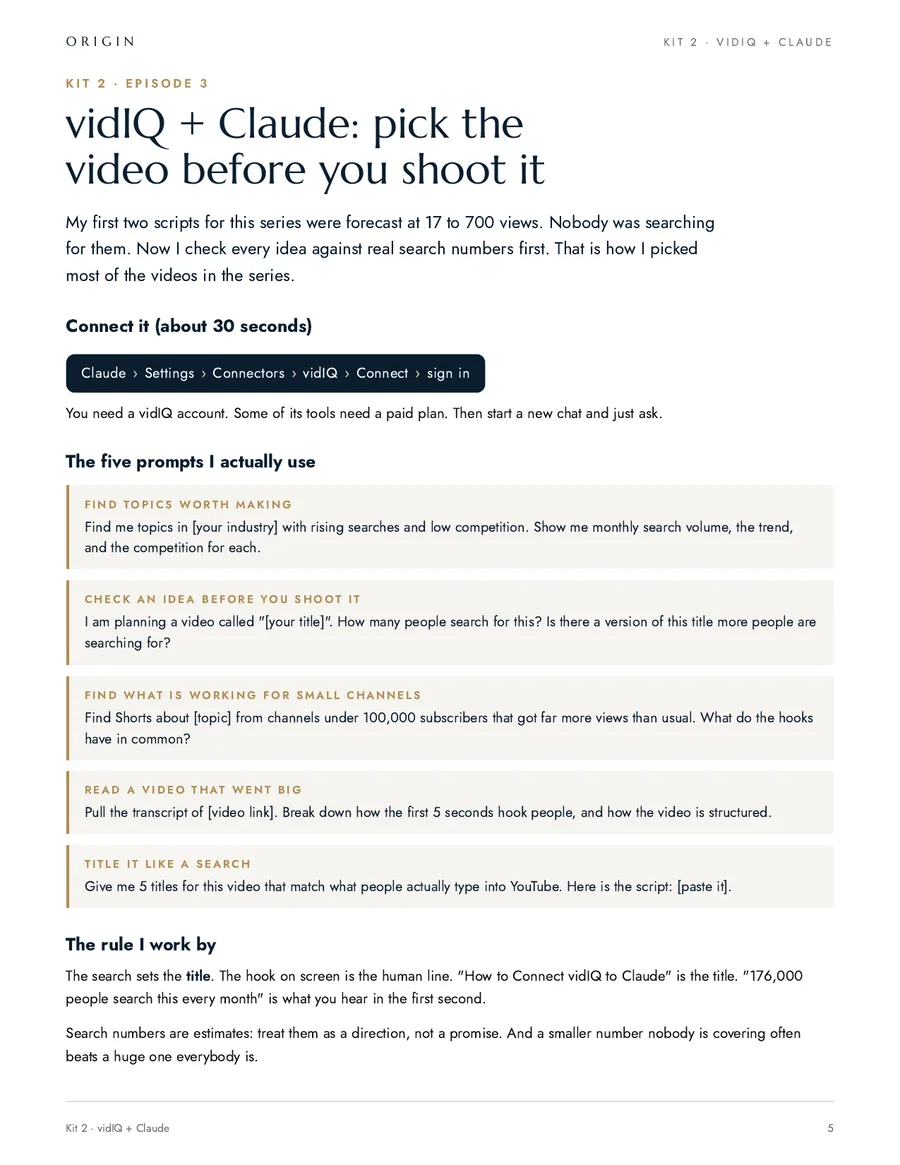
My first two scripts for this series were forecast at 17 to 700 views. Nobody was searching for them. Now I check every idea against real search numbers first. That is how I picked most of the videos in the series.
What you end up with
You stop guessing what to make. You ask a question in plain English and get back what people are actually searching for this month, whether anyone is covering it, what is working right now for channels your size, and a title built from the words people type instead of the words you like.
Honest version: this is a research tool, not a growth tool. It tells you what to make and what to call it. It does not make you good on camera and it does not write your hook. Those are still yours.
What you need
- A paid Claude plan, so you can use connectors.
- A vidIQ account. The free one answers most of what is below.
- A channel, or an honest idea of the one you are about to start.
1. Connect it
Claude Settings Connectors vidIQ Connect Sign in
Test it in a new chat before you plan anything: "How many people search for [something in your world] on YouTube each month?" If a number comes back, you are connected.
2. The five prompts I actually use
Find me topics in [your industry] with rising searches and low competition. Show me monthly search volume, the trend, and the competition for each.
I am planning a video called "[your title]". How many people search for this? Is there a version of this title more people are searching for?
Find Shorts about [topic] from channels under 100,000 subscribers that got far more views than usual. What do the hooks have in common?
Pull the transcript of [video link]. Break down how the first 5 seconds hook people, and how the video is structured.
Give me 5 titles for this video that match what people actually type into YouTube. Here is the script: [paste it].
3. Turn the answers into a week you can actually shoot
A list of topics is not a plan. This is the prompt that turns the research into things you can film in one sitting.
Here are the topics you found. I can film for [two hours] this week.

Pick the [five] worth making, and for each one give me:
- the search people are typing, and the monthly volume
- the title, in their words
- the first line I say out loud, which is not the title
- the one point the video makes, in a sentence
- what I have to show on screen for it to be believable

Only pick topics I can speak to from experience: [one line on what you actually do]. If a topic has big volume but I have no real story for it, leave it out and say why.
4. Take one video that went big apart
This is worth more than any list of topics. Find a video in your world that did far better than the channel normally does, and study why instead of guessing.
Pull the transcript of [video link] and the stats for that channel.

Tell me:
- how many views this got compared to what that channel usually gets
- the first 5 seconds, word for word, and what it is doing: a question, a number, a claim, a face
- how the video is built, section by section, with roughly how long each part runs
- where it would have lost me, if anywhere
- what I could steal about the structure without copying the content

Then write the version of the first 5 seconds that would work for [what you do], in my words, not theirs.
The rule I work by
The search sets the title. The hook on screen is the human line. "How to Connect vidIQ to Claude" is the title, because that is what people type. "176,000 people search this every month" is what you hear in the first second, because nobody says a title out loud.
What goes wrong, and the fix
- You chase the biggest number. Volume with a wall of established channels in front of it is worth less than a smaller number nobody is covering. Ask for both and read them together.
- It hands you topics you cannot speak to. Tell it what you actually do and give it permission to throw topics out.
- The titles come back as clickbait. Say it plainly: the title has to be true after they watch it. A title that beats the video costs you the next one.
- It quotes a number and you repeat it on camera. Search volumes are estimates. Say "about" or do not say it at all.
- Every idea starts sounding the same. Feed it your last ten videos and ask what you keep making, then ask for the one you have never made.
Before you shoot
- Say the first line out loud. If it sounds like a title, rewrite it.
- Check you have the proof. If the point needs a number or a screen, have it ready before you hit record.
- Check the title against the search, not against your taste.
Search numbers are a direction, not a promise. The research tells you what to point the camera at. It cannot tell you whether what you say next is worth hearing.
What happens once it is set up
Their words, not ours.
“I went from an independent contractor to a business owner, and that is what Zack has done for me.”
- $7.3M
- sold last year
- ~$11M
- this year, with pending closings
Numbers as Beau said them, October 2026.
Beau P.Real Estate Team Leader, Empire Real Estate Firm
-
He changed how I actually prompt and use AI day to day, and my results are noticeably better because of it.
Sam O. Founder
Sharper AI, tighter sales
-
Origin brought systems and clarity to a team that really needed it, and did it in a way that stuck.
Carrie A. Events Director, AFSP Long Island Chapter
Clear ownership, AI that stuck
-
He doesn't just talk the talk, he puts his mind to things and gets it done, and then he teaches other business owners how to do the same.
Harlan M. Real Estate Agent
AI from zero: emails to a full website
Free, and I do mean free
Want help setting it up? Book 30 minutes with me.
You bring this playbook and whatever is in your way. We set it up together on the call. No pitch, no card, and if it is not a fit for us to work together I will still leave you with it working.
- Bring your screen. We do it live, not in theory.
- Thirty minutes. If we finish early, you get the time back.
- If you want more after that, we can talk. If not, you keep the system.
The other playbooks
- Episode 2 The after-call system The skill that grades the call, logs every promise, writes the follow-up and updates the CRM.
- Episode 4 How Claude edits my videos The honest setup behind the series, and the edit rules that keep every video on brand.
- Episode 5 Train Claude to write like you Your voice, your company and your rules in one place, read before it writes anything.
- Episode 8 The skills starter kit The prompt that makes Claude interview you and write the skill, plus three to start with.
- Episode 9 What a real build takes A buyer’s guide to custom software: what AI made easy, the eight parts it did not, and how to tell if you are ready.
- Episode 17 Build your website with Claude The honest process behind a 72-page site: the words first, one page at a time, and the phone test that makes it feel like you.
While you are here